No. 13of 22StationSoftware
IoT security device with a 3D monitoring dashboard
LumeEdge / SafeEdge
An ESP32 security device with a cloud pipeline for anomaly detection and incident summaries, and a dashboard with a 3D floor plan and an attack simulator. A team project built for Microsoft Imagine Cup 2026. The model was trained on synthetic data, most sensor readings are simulated, and the Azure deployment is unverified.
- When
- Oct 2025 – Feb 2026
- Status
- Built
- Team
- Team project, built for Microsoft Imagine Cup 2026.
Progress
Progress55%
A working demo with a real ESP32 and a polished dashboard. The model was trained on synthetic data, most sensor readings are simulated, and the Azure deployment is unverified.
What comes next
- Wire the temperature, humidity and vibration sensors for real.
- Train or evaluate the anomaly model on recorded telemetry, and save the metrics.
- Record one short demo with no unsupported figure on screen.
1 of 4
sensor readings comes from real hardware: motion
Temperature, humidity and vibration are random values generated in the firmware.
Device firmware (safeedge_complete_firmware.ino)Verified. Backed by a file or public page that has been checked.Device firmware (safeedge_complete_firmware.ino) — Read in the project audit of 13 November 2026.5,000 + 250
synthetic samples, normal and anomalous, used to train the anomaly model
Generated data, not recorded telemetry.
Model training code (azure-ml)Verified. Backed by a file or public page that has been checked.Model training code (azure-ml) — Read in the project audit of 13 November 2026.100trees
in the Isolation Forest, over 5 features, with contamination set to 0.05
A configuration, not a result.
Model configuration file (model_config.json)Verified. Backed by a file or public page that has been checked.Model configuration file (model_config.json) — Read in the project audit of 13 November 2026.Not saved
model accuracy
Printed to the console during training and never saved, so no figure is quoted. The scores on the dashboard are per-event demo output, not a benchmark.
Training script (azure-ml/train_anomaly_model.py)Verified. Backed by a file or public page that has been checked.Training script (azure-ml/train_anomaly_model.py) — Read in the project audit of 13 November 2026.Exhibit 01 · Walk-through
The attack simulation, step by step
Step 01
The device comes online
A demo script on the laptop connects to the ESP32 over a serial port, reads its Wi-Fi status and registers it with the backend.
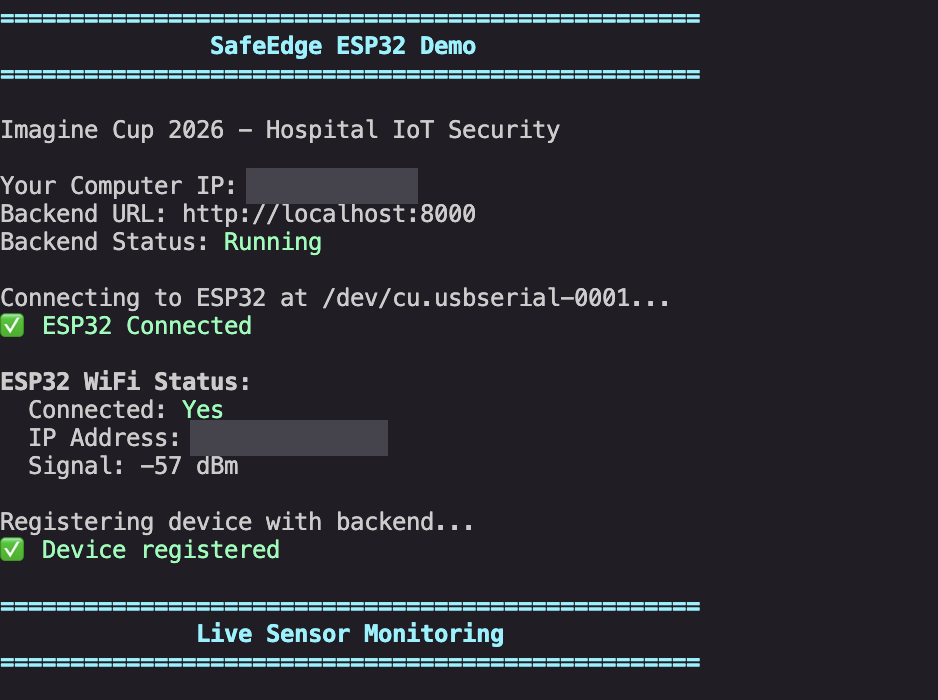
Terminal capture, January 2026. Two local network addresses are covered. Step 02
Readings stream in
The script says what it is doing: "Simulating NICU incubator sensor readings". Ten rows go to the backend. Eight are scored safe, one a warning at 35.0 °C, one a danger at 42.0 °C.
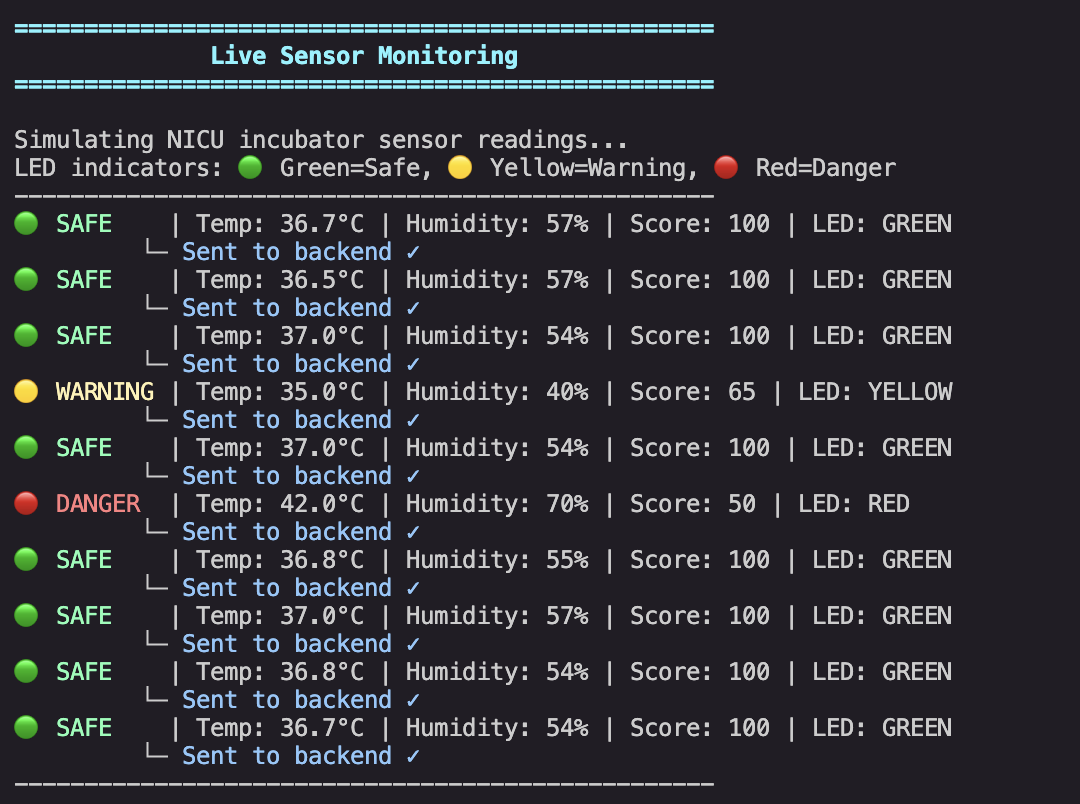
Simulated readings, as the capture itself states. Step 03
A temperature spike is simulated
The script sends a 42.5 °C reading as an attack. The output reports the attack detected, the buzzer and the red LED switched on, and the threat marked as blocked. It is a scripted simulation of one event, not a test against a real attack.
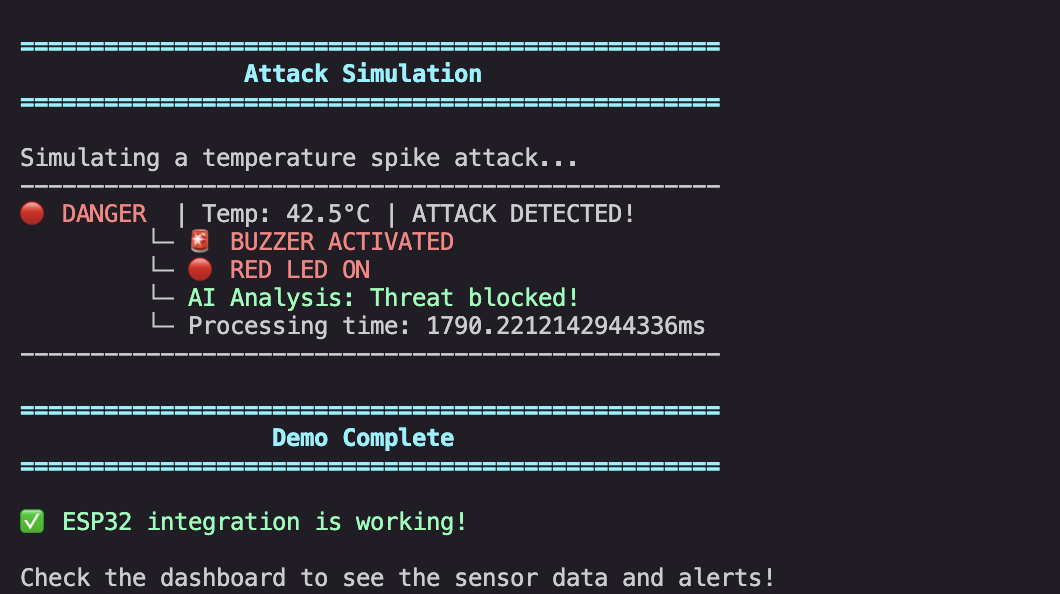
The simulated attack, as printed by the demo script. Step 04
The same scenarios in the dashboard
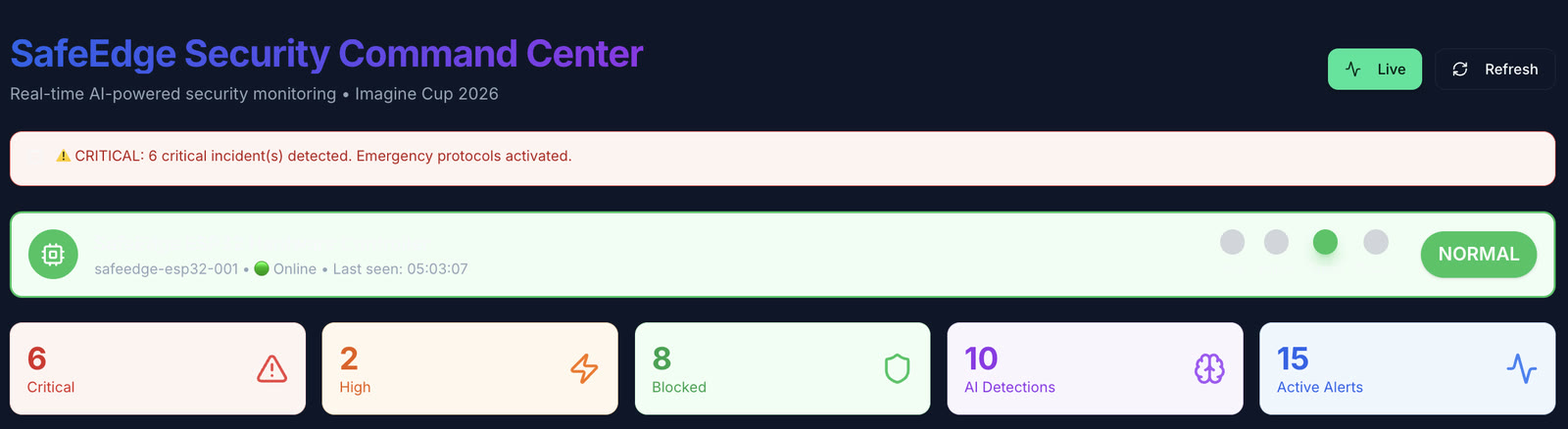
The dashboard has a simulator page with five scenarios: temperature, power, network intrusion, unauthorized access and malware. Each has a Simulate Attack button that plays the scenario and writes it to a simulation log.
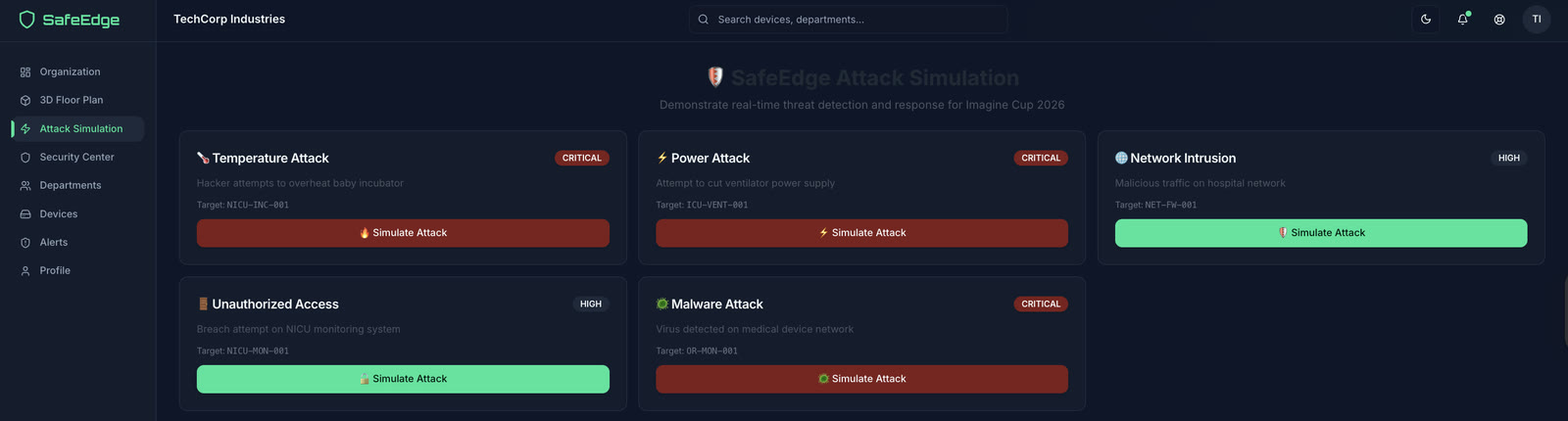
The attack simulator page, January 2026, for a placeholder organization.
Exhibit 02 · Video
The device itself
The LumeEdge device in its enclosure, 16 seconds, no sound. Its status LED turns from green to red; in the demo, green means safe and red means danger. What triggered the change in this recording is not documented.
01
What it is
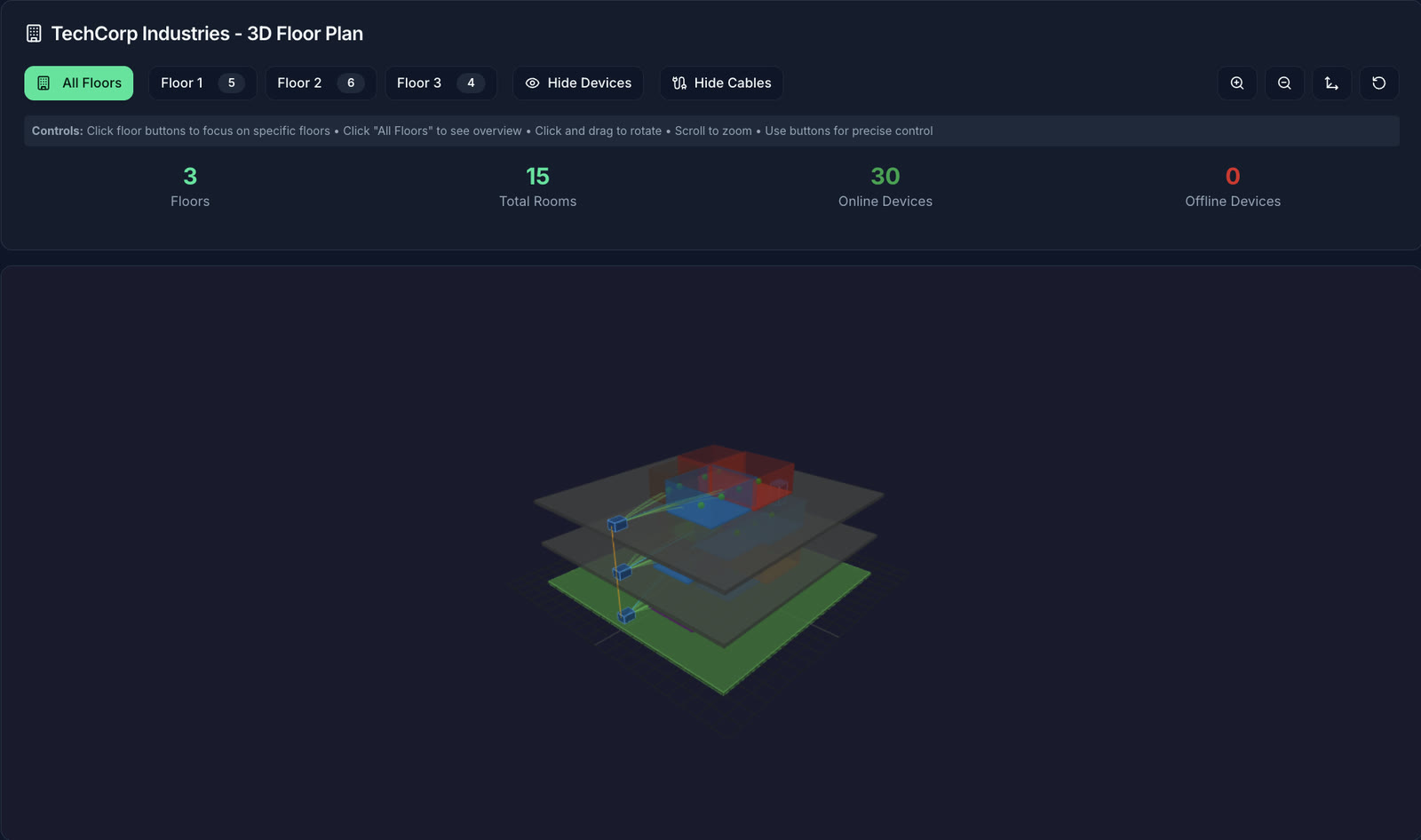
LumeEdge, which its dashboard calls SafeEdge, is a security monitor for connected devices in a building. The demo scenario is a hospital: an incubator in a neonatal unit. A small ESP32 device reports to the cloud, an anomaly model and a language model comment on what it reports, and staff watch a dashboard with a 3D floor plan and an attack simulator. We built it as a team for Microsoft Imagine Cup 2026, with the main push between 6 and 10 January 2026. This page claims no result from the competition.
02
What was built
The device is an ESP32 with Ethernet, a motion sensor, a vibration sensor, a temperature and humidity sensor, status LEDs and a buzzer, with an enclosure designed in OpenSCAD. The code includes firmware that uses X.509 certificates and TLS for Azure IoT Hub, Azure Functions for ingestion and anomaly detection, an Isolation Forest model, incident summaries written by a language model, and voice and phone alerts. The dashboard is Next.js and TypeScript, 122 components, with a Three.js floor plan, live device status, an attack simulator and a multi-tenant admin side, over a FastAPI backend. The project started from a login-app starter template and was heavily extended.
03
What is real and what is simulated
The ESP32 is real and shows as online in some of the demo captures; the video on this page shows it in its enclosure with the status LED switching. The motion sensor is read from hardware. The temperature, humidity and vibration readings are random numbers generated in the firmware. The anomaly model, an Isolation Forest with 100 trees over 5 features, was trained on synthetic data: 5,000 generated normal samples and 250 anomalous ones. Its accuracy was printed to a console and never saved, so none is quoted here; the scores the dashboard shows are for single demo events, not a benchmark. And the Azure deployment is suggested by addresses in the code but not proven by the files.
04
What I'd change
Wire the temperature, humidity and vibration sensors for real. Train, or at least evaluate, the model on recorded telemetry and save the numbers. Take out every dashboard figure that is not computed from data. Then record one short, clean demo.
Figures
One question
The answer is on this page. Get it right and it goes in your passport on the map.
Challenge· stamped
The LumeEdge device reports temperature, humidity, vibration and motion. In the demo build, how many of those four readings come from a real sensor?
Only the motion sensor is read from hardware. Temperature, humidity and vibration are random values generated in the firmware. Source: the audit of the device firmware, 13 November 2026.
Show the answer
One. Only the motion sensor is read from hardware. Temperature, humidity and vibration are random values generated in the firmware. Source: the audit of the device firmware, 13 November 2026.
- Stack
- ESP32
- Arduino / MicroPython
- OpenSCAD
- Azure IoT Hub
- Azure Functions
- Azure ML (Isolation Forest)
- Azure SQL
- Azure OpenAI / Groq
- ElevenLabs
- Twilio
- Next.js 15
- TypeScript
- Three.js
- FastAPI